This is going to be a short post and continuation of my previous post. I finally have some code that successfully created an initial bounding box. This post will contain a few images showing the placement as well as the code itself. This time I’m sharing an example of my query and the exact output of ChatGPT-4o. If you’d like to review and download, check out my GitHub. I’m working on fine-tuning this code even further. Stay tuned!
ChatGPT-4o Query:


“Wow! I think we finally aligned some bounding boxes. It appears that the quality of images may have impacted it. What is your opinion as an expert in Computer Science, Mathematics, and Machine Learning? I’ve attached the images. It does appear that they have mainly a single box. Is that because the bounding box is being placed after the area has been scanned and found? Does that make sense? Like if the image contains all 3 sections it simply creates a single bounding box to capture all three? Like how the images show.”
ChatGPT-4o Response:
Understanding the Current Behavior
- Bounding Box Aggregation:
- The current script may be creating a single bounding box that captures multiple sections if they are detected as a single object. This can happen if the object detection model is not distinguishing between different parts of the card (e.g., name, central image, and number).
- ROI Filtering:
- The script checks if the detected bounding boxes fall within any of the defined ROIs. If a single detection spans multiple ROIs, it could result in a bounding box that covers all these areas.
Improvements and Considerations
- Separate Detection for Each ROI:
- One way to improve this is to apply the detection model separately for each ROI. This ensures that each region is treated independently.
- Adjusting Confidence Threshold:
- Adjusting the confidence threshold for detection can help in filtering out less certain detections, reducing the chance of aggregating multiple regions.
- Manual Annotation and Training:
- If the object detection model is not accurately distinguishing between different sections, consider manually annotating a subset of images and retraining the model.
Revised Code with Separate Detection for Each ROI
Here’s how you can modify the script to apply the detection model separately for each ROI:
import os
import cv2
import numpy as np
import tensorflow as tf
from tensorflow.keras.preprocessing.image import ImageDataGenerator, img_to_array
from sklearn.preprocessing import LabelEncoder
from tensorflow.keras.utils import to_categorical
import time
import shutil
import supervision as sv

def archive_old_visualizations(visualization_dir, archive_dir):
    if not os.path.exists(archive_dir):
        os.makedirs(archive_dir)
    for file_name in os.listdir(visualization_dir):
        file_path = os.path.join(visualization_dir, file_name)
        if os.path.isfile(file_path):
            shutil.move(file_path, os.path.join(archive_dir, file_name))

def load_and_augment_images_from_folder(folder, size=(224, 224), sample_size=None):
    images = []
    labels = []
    datagen = ImageDataGenerator(
        rotation_range=20,
        width_shift_range=0.2,
        height_shift_range=0.2,
        shear_range=0.2,
        zoom_range=0.2,
        horizontal_flip=True,
        brightness_range=[0.8, 1.2],
        fill_mode='nearest'
    )

    print(f"Loading images from: {folder}")
    start_time = time.time()

    files = sorted(
        (os.path.join(folder, fn) for fn in os.listdir(folder) if fn.endswith('.png')),
        key=os.path.getmtime,
        reverse=True
    )

    for i, file_path in enumerate(files):
        if sample_size and i >= sample_size:
            break
        label = os.path.basename(file_path).split('_')[0]
        img = cv2.imread(file_path, cv2.IMREAD_COLOR)
        if img is not None:
            img = resize_and_pad(img, size)
            img = img_to_array(img)
            images.append(img)
            labels.append(label)

            # Apply data augmentation
            img = img.reshape((1,) + img.shape)
            for batch in datagen.flow(img, batch_size=1):
                augmented_img = batch[0].astype('float32')
                augmented_img = resize_and_pad(augmented_img, size)
                images.append(augmented_img)
                labels.append(label)
                break

            # Log progress every 10 images
            if (i + 1) % 10 == 0:
                elapsed_time = time.time() - start_time
                print(f"Processed {i + 1} images in {elapsed_time:.2f} seconds")

    end_time = time.time()
    print(f"Finished loading images at {time.strftime('%Y-%m-%d %H:%M:%S', time.gmtime(end_time))}")
    print(f"Total loading time: {end_time - start_time} seconds")

    return np.array(images), np.array(labels)

def resize_and_pad(image, size):
    old_size = image.shape[:2]  # old_size is in (height, width) format
    ratio = float(size[0]) / max(old_size)
    new_size = tuple([int(x * ratio) for x in old_size])
    image = cv2.resize(image, (new_size[1], new_size[0]))

    delta_w = size[1] - new_size[1]
    delta_h = size[0] - new_size[0]
    top, bottom = delta_h // 2, delta_h - (delta_h // 2)
    left, right = delta_w // 2, delta_w - (delta_w // 2)

    color = [0, 0, 0]
    new_image = cv2.copyMakeBorder(image, top, bottom, left, right, cv2.BORDER_CONSTANT, value=color)
    return new_image

def load_image_into_numpy_array(path):
    return np.array(cv2.imread(path, cv2.IMREAD_COLOR))

def detect_objects(image_np, model):
    input_tensor = tf.convert_to_tensor(image_np)
    input_tensor = input_tensor[tf.newaxis, ...]
    detections = model(input_tensor)

    detection_boxes = detections['detection_boxes'][0].numpy()
    detection_scores = detections['detection_scores'][0].numpy()
    detection_classes = detections['detection_classes'][0].numpy()

    return detection_boxes, detection_scores, detection_classes

def filter_boxes_by_roi(boxes, scores, classes, roi, threshold=0.5):
    filtered_boxes = []
    for i in range(boxes.shape[0]):
        box = boxes[i]
        score = scores[i]
        if score > threshold:
            ymin, xmin, ymax, xmax = box
            if (roi[0] <= ymin <= roi[2] and roi[1] <= xmin <= roi[3]):
                filtered_boxes.append((box, score, classes[i]))
    return filtered_boxes

model_dir = '/home/t1000/Pokedex_Project/models/ssd_resnet50_v1_fpn_640x640_coco17_tpu-8'
model = tf.saved_model.load(os.path.join(model_dir, 'saved_model'))

large_images_dir = '/home/t1000/Pokedex_Project/data/pokemon_card_images/large_images'
visualization_dir = '/home/t1000/Pokedex_Project/data/visualizations'
archive_dir = '/home/t1000/Pokedex_Project/data/archive'
archive_old_visualizations(visualization_dir, archive_dir)  # Archive old visualization images before creating new ones

images, labels = load_and_augment_images_from_folder(large_images_dir, sample_size=100)

if images.size == 0 or len(labels) == 0:
    print("No images or labels loaded. Exiting.")
    exit()

images = images.astype('float32') / 255.0

label_encoder = LabelEncoder()
integer_encoded = label_encoder.fit_transform(labels)

if len(integer_encoded) == 0:
    print("No labels to encode. Exiting.")
    exit()

one_hot_labels = to_categorical(integer_encoded)

output_file = '/home/t1000/Pokedex_Project/data/boxes.npy'

annotations = []
start_time = time.time()

# Define adjusted ROIs for name, series number, and central image
name_roi = [0.0, 0.0, 0.1, 1.0]  # Top 10% of the image
number_roi = [0.9, 0.0, 1.0, 1.0]  # Bottom 10% of the image
central_image_roi = [0.1, 0.1, 0.6, 0.9]  # From 10% to 60% vertically, and 10% to 90% horizontally

for filename in os.listdir(large_images_dir):
    if filename.endswith('.jpg') or filename.endswith('.png'):
        image_path = os.path.join(large_images_dir, filename)
        image_np = load_image_into_numpy_array(image_path)
        image_np = resize_and_pad(image_np, (224, 224))

        boxes, scores, classes = detect_objects(image_np, model)

        # Filter detections for each ROI separately
        name_boxes = filter_boxes_by_roi(boxes, scores, classes, name_roi)
        number_boxes = filter_boxes_by_roi(boxes, scores, classes, number_roi)
        central_image_boxes = filter_boxes_by_roi(boxes, scores, classes, central_image_roi)

        all_filtered_boxes = name_boxes + number_boxes + central_image_boxes

        # Process the filtered boxes
        for box, score, class_id in all_filtered_boxes:
            ymin, xmin, ymax, xmax = box
            (im_height, im_width, _) = image_np.shape
            (xmin, xmax, ymin, ymax) = (xmin * im_width, xmax * im_width, ymin * im_height, ymax * im_height)
            annotations.append([filename, int(xmin), int(ymin), int(xmax), int(ymax)])

end_time = time.time()
print(f"Finished bounding box extraction at {time.strftime('%Y-%m-%d %H:%M:%S', time.gmtime(end_time))}")
print(f"Total bounding box extraction time: {end_time - start_time} seconds")

if len(annotations) == 0:
    print("No annotations found. Exiting.")
    exit()

boxes = np.array(annotations)
np.save(output_file, boxes)

output_dir = '/home/t1000/Pokedex_Project/data'
os.makedirs(output_dir, exist_ok=True)

np.save(os.path.join(output_dir, 'images.npy'), images)
np.save(os.path.join(output_dir, 'labels.npy'), one_hot_labels)

visualization_output_dir = '/home/t1000/Pokedex_Project/data/visualizations'
os.makedirs(visualization_output_dir, exist_ok=True)

def save_bounding_box_images(images, boxes, sample_size=10):
    timestamp = int(time.time())
    bounding_box_annotator = sv.BoundingBoxAnnotator()

    for i in range(sample_size):
        image = (images[i] * 255).astype(np.uint8)  # Convert back to 8-bit image
        box = boxes[i, 1:]
        print(f"Image {i} Box coordinates: {box}")

        detections = sv.Detections(
            xyxy=np.array([box]),
            class_id=np.array([0]),  # Assuming all boxes have the same class id for simplicity
            confidence=np.array([0.94])  # Assuming a fixed confidence for simplicity
        )

        annotated_frame = bounding_box_annotator.annotate(
            scene=image.copy(),
            detections=detections
        )

        output_path = os.path.join(visualization_output_dir, f"image_with_box_{timestamp}_{i}.png")
        cv2.imwrite(output_path, annotated_frame, [cv2.IMWRITE_PNG_COMPRESSION, 0])

# Only save images with bounding boxes for a sample of 10
save_bounding_box_images(images, boxes, sample_size=10)
Explanation
- Separate Detection for Each ROI:
- The script applies the object detection model and then filters the boxes separately for each ROI (
name_roi,number_roi,central_image_roi).
- The script applies the object detection model and then filters the boxes separately for each ROI (
- Filter Boxes by ROI:
- A helper function
filter_boxes_by_roifilters the detected boxes to ensure only those within the specified ROI are considered.
- A helper function
- Maintaining Image Quality:
- The
resize_and_padfunction ensures images are resized while maintaining their aspect ratio and quality.
- The
By applying detection separately for each ROI and filtering the results accordingly, you should see improved alignment and more accurate bounding boxes for each region of interest.
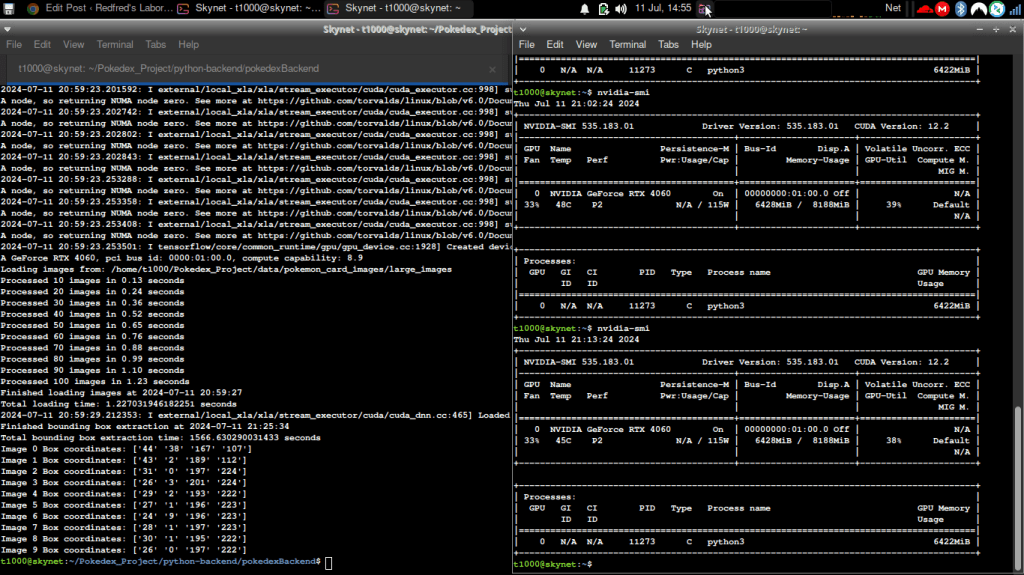
Actual Screenshot of Code Running:
I use a ThinkPad laptop booted with Xubuntu that I bought in Japan as my terminal system to SSH into my Ubuntu Server 22.04 partition on my desktop with an Nvidia RTX 4060, as seen by the nvidia-smi command output.
 Redfred's Laboratory
Leave a comment