
Building an Image-to-Sticker Generator Using Stable Diffusion, Shopify, and Printify
It’s been a while since my last post! I have to applaud people who consistently blog—it’s much harder than I expected, even with assistance from tools like ChatGPT. For this post, I’m sharing a project I’ve been working on that integrates Stable Diffusion 2.1 with Shopify and Printify APIs to create a custom image-to-sticker generator. There’s still a lot of work to be done, but it’s exciting to see the progress, and I’d love feedback from developers out there!
Overview of the Project
This project allows users to visit my website, Put A Cat On It, and generate custom cat stickers. Users can enter a description of a cat (e.g., “a cat surfing on a wave”) into a text box, and an image is generated using Stable Diffusion 2.1. The generated image is then uploaded to Printify to create a sticker product, which is automatically published on Shopify and available for purchase.
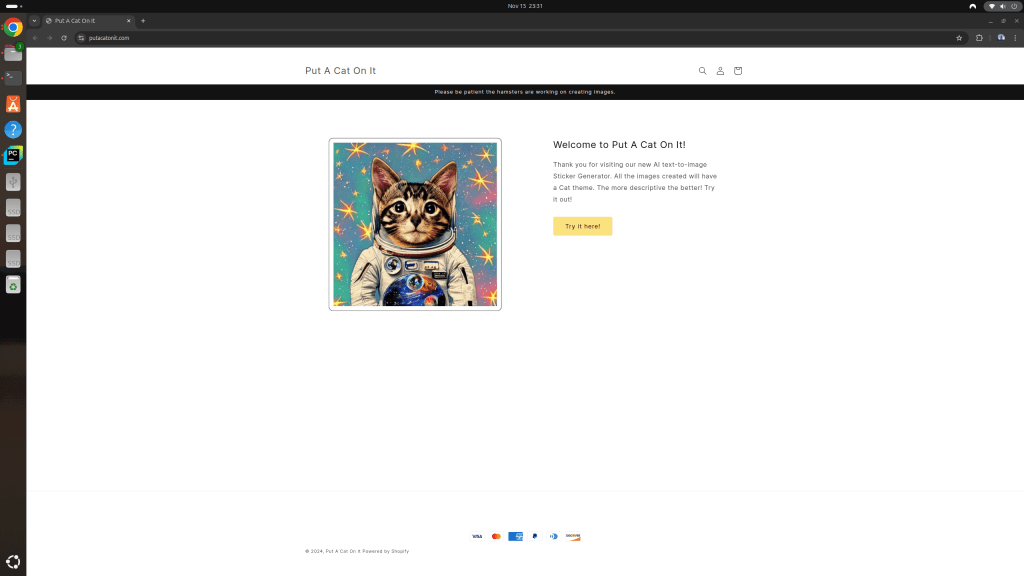
Here’s how it works:
- Visit the Website: Users access the site and click the “Try it here!” button, which directs them to the image generation tool.
- Enter a Description: Users input text describing their cat sticker idea.
- Generate and Publish: The app creates the image, uploads it to Printify, and publishes it as a new Shopify product.
The theme revolves entirely around cats, and I used Shopify’s built-in theme for the front-end.

Current Challenges
While the process works end-to-end, there is a significant issue I’ve encountered:
- The Redirect Issue: After the product is created and published, the generated URL does not immediately redirect to the newly created product. The product appears in Shopify after about 2:30–3:00 minutes due to processing delays, but the link generated by the app doesn’t account for this delay.
I’ve identified that the problem likely lies in the JavaScript code, where the URL is generated before Shopify has fully published the product.

Debugging the Process
Here’s a snippet of my Flask server logs showing the process flow:
100%|██████████| 15/15 [00:08<00:00,  1.75it/s]
2024-11-15 23:43:04,212 - INFO - Image generated successfully.
2024-11-15 23:43:04,371 - INFO - Uploading image to Printify...
2024-11-15 23:43:05,864 - INFO - Image uploaded successfully with ID: [REDACTED].
2024-11-15 23:43:05,864 - INFO - Creating product on Printify...
2024-11-15 23:43:07,193 - INFO - Product created successfully on Printify with ID: [REDACTED].
2024-11-15 23:43:08,630 - INFO - Product published successfully.
2024-11-15 23:43:08,630 - INFO - API call to /api/generate completed successfully.
The issue lies between product creation and product URL availability. The link is provided before Shopify has fully processed the product, which causes a “404 – Page Not Found” error when clicked immediately.
Current Workaround
For now, if the redirect fails, users can click the “Continue Shopping” button on the error page. This takes them to the storefront collection, where all generated stickers are listed and available for purchase. While this works, it’s not ideal, and I aim to fix the root cause.

Proposed Solution
To address this issue, I’m planning to implement a polling mechanism in JavaScript. Here’s how it will work:
- After creating the product, the app will periodically check Shopify to see if the product URL is available.
- Once Shopify confirms the product has been published, the app will dynamically update the link in the feedback message.
I’ve already started building this polling mechanism using ChatGPT, and I’ll share updates on how it works once implemented.
Please let me know your thoughts! I’ll include the code below as well as a reminder it’s on my GitHub.
Here’s the code for the Flask server. Let me know your feedback. Remember all of this code was generate by ChatGPT-4o with Canvas.
from flask import Flask, request, jsonify
from flask_cors import CORS
import torch
from diffusers import StableDiffusionPipeline
from PIL import Image
import base64
from io import BytesIO
from torch.cuda.amp import autocast
import requests
import logging
import hmac
import hashlib

app = Flask(__name__)
CORS(app)

# Set up logging configuration
logging.basicConfig(level=logging.INFO, format='%(asctime)s - %(levelname)s - %(message)s')

# Stable Diffusion model configuration
model_id = "stabilityai/stable-diffusion-2-1"
device = "cuda" if torch.cuda.is_available() else "cpu"
access_token = "your_huggingface_access_token"  # Replace with your HuggingFace access token

# Load the Stable Diffusion pipeline
logging.info("Loading Stable Diffusion Pipeline...")
try:
    pipe = StableDiffusionPipeline.from_pretrained(
        model_id,
        torch_dtype=torch.float16,
        token=access_token
    )
    pipe = pipe.to(device)
    pipe.enable_sequential_cpu_offload()
    logging.info("Pipeline loaded successfully.")
except Exception as e:
    logging.error(f"Failed to load Stable Diffusion Pipeline: {e}")
    pipe = None

# Environment variables for sensitive information
PRINTIFY_API_KEY = "your_printify_api_key"  # Replace with your Printify API key
SHOP_ID = "your_shop_id"  # Replace with your Printify shop ID
SHOPIFY_WEBHOOK_SECRET = "your_shopify_webhook_secret"  # Replace with your Shopify webhook secret

# In-memory product status tracking (for testing purposes)
published_products = {}

# Function to verify webhook authenticity
def verify_webhook(data, hmac_header):
    calculated_hmac = base64.b64encode(
        hmac.new(
            SHOPIFY_WEBHOOK_SECRET.encode('utf-8'),
            data,
            hashlib.sha256
        ).digest()
    )
    return hmac.compare_digest(calculated_hmac, hmac_header.encode('utf-8'))

# Generate image function
def generate_image(description):
    logging.info(f"Generating image for description: {description}")
    full_prompt = f"a cat {description}"

    if pipe is None:
        logging.error("Stable Diffusion pipeline is not loaded.")
        return None

    with torch.no_grad():
        torch.cuda.empty_cache()
        with autocast():
            try:
                image = pipe(prompt=full_prompt, num_inference_steps=15, guidance_scale=3.5).images[0]
                logging.info("Image generated successfully.")
            except Exception as ex:
                logging.error(f"Failed to generate image: {ex}")
                return None

        buffered = BytesIO()
        image.save(buffered, format="PNG")
        img_str = base64.b64encode(buffered.getvalue()).decode("utf-8")
        return img_str

# Upload image to Printify
def upload_image_to_printify(image_data, file_name):
    url = "https://api.printify.com/v1/uploads/images.json"
    headers = {
        "Authorization": f"Bearer {PRINTIFY_API_KEY}",
        "Content-Type": "application/json"
    }
    data = {
        "file_name": file_name,
        "contents": image_data
    }

    logging.info("Uploading image to Printify...")
    try:
        response = requests.post(url, headers=headers, json=data)
        if response.status_code == 200:
            logging.info("Image uploaded successfully.")
            return response.json()
        else:
            logging.error(f"Failed to upload image to Printify: {response.status_code}")
            return {}
    except Exception as ex:
        logging.error(f"Exception during image upload: {ex}")
        return {}

# Flask API routes
@app.route('/api/generate', methods=['POST'])
def generate():
    description = request.json.get('description', '')
    if not description:
        return jsonify({"error": "Description not provided"}), 400

    # Generate image
    image_data = generate_image(description)
    if not image_data:
        return jsonify({"error": "Image generation failed"}), 500

    file_name = description.replace(' ', '_') + '.png'

    # Upload image to Printify
    upload_response = upload_image_to_printify(image_data, file_name)
    if not upload_response.get('id'):
        return jsonify({"error": "Failed to upload image to Printify"}), 500

    # Placeholder for further logic (e.g., creating products, publishing to Shopify)
    return jsonify({"message": "Image generated and uploaded successfully!"})

if __name__ == '__main__':
    logging.info("Starting Flask app...")
    app.run(debug=True, host='0.0.0.0', port=5000)
Now, here’s the HTML code for the Shopify Liquid section.
<div id="generate-section" style="text-align: center; margin-top: 20px;">
    <!-- Input field for sticker description -->
    <input
        type="text"
        id="description"
        placeholder="Enter description for your cat sticker"
        style="padding: 12px; width: 300px; font-size: 1rem; border-radius: 8px; border: 1px solid #ccc; margin-bottom: 10px;"
    />
    <!-- Button to generate the image -->
    <button
        id="generate-button"
        style="padding: 12px 20px; font-size: 1rem; border-radius: 8px; background-color: #007bff; color: white; border: none; cursor: pointer; margin-left: 10px;"
    >
        Generate Image
    </button>
    <!-- Area to display feedback messages -->
    <div id="feedback-message" style="margin-top: 20px; color: green;"></div>
    <!-- Loading spinner displayed during API requests -->
    <div id="loading-spinner" style="display: none; margin-top: 20px;">
        <img
            src="https://cdn.shopify.com/s/files/1/0666/1288/7725/files/Blue_Cat_1x-1.0s-200px-200px.gif?v=1730875071"
            alt="Loading..."
            style="width: 80px; height: 80px;"
        />
    </div>
</div>

<!-- Link the external JavaScript file -->
http://%20'input_text_script.js'%20|%20asset_url%20
And finally, here’s the JavaScript code that is saved as an asset file in the Code Editor section of the Shopify theme editor.
document.addEventListener("DOMContentLoaded", function () {
    const generateButton = document.getElementById("generate-button");

    generateButton.addEventListener("click", function (event) {
        event.preventDefault();
        const description = document.getElementById("description").value;

        // Basic validation
        if (!description) {
            alert("Please enter a description.");
            return;
        }
        if (description.length > 100) {
            alert("Description is too long. Please keep it under 100 characters.");
            return;
        }

        // Show loading spinner and clear previous feedback
        document.getElementById("loading-spinner").style.display = "block";
        document.getElementById("feedback-message").innerHTML = "";

        // API URL (replace with your Flask server's endpoint)
        const generateApiURL = "https://your-flask-api.com/api/generate";

        // Make API call to Flask
        fetch(generateApiURL, {
            method: "POST",
            headers: {
                "Content-Type": "application/json"
            },
            body: JSON.stringify({
                description: description
            }),
        })
        .then(response => {
            if (!response.ok) {
                throw new Error("Failed to generate image");
            }
            return response.json();
        })
        .then(data => {
            if (data.error) {
                throw new Error(data.error);
            }

            // Hide the loading spinner and provide feedback
            document.getElementById("loading-spinner").style.display = "none";
            document.getElementById("feedback-message").innerHTML = `
                <a href="${data.product.product_url}" target="_blank" style="text-decoration: none; color: #007bff; font-weight: bold;">
                    Your Cat Sticker is Ready! Click Here!
                </a>
            `;
        })
        .catch(error => {
            console.error("Error:", error);
            document.getElementById("feedback-message").innerHTML = `
                <span style="color: red; font-weight: bold;">Error: ${error.message}</span>
            `;
            document.getElementById("loading-spinner").style.display = "none";
        });
    });
});
I think I know the error is being caused by the the JavaScript code providing the hyperlink when the product is published and not when the URL is provided. That will be my next focus using ChatGPT. I hope you enjoyed this blog post. It’s amazing how far we’ve come with Generative AI.
Conclusion
This project has been a fantastic learning experience. From integrating Stable Diffusion to automating Shopify product creation, I’ve tackled many challenges and gained a deeper understanding of APIs and webhooks.
That said, I’m still very much a beginner and welcome feedback or suggestions for improvement—especially on the JavaScript polling mechanism. Feel free to check out the full code on my GitHub and leave your comments!
Thank you for reading, and I hope to post more consistently in the future!
 Redfred's Laboratory
Leave a comment